You can import Bates numbers created for external productions in a way that the respective documents can be produced using the imported Bates numbers.
Note: Merge to an Axcelerate Review & Analysis index engine. Axcelerate Review & Analysis contains all the fields needed for mapping by default.
Besides a unique identifier, the CSV file contains at least these fields:
-
Beg Bates
This field must be mapped to two different CORE fields: BEGBATES and External Bates.
-
End Bates
This field is needed for production validation.
As CSV merge does not allow you to map one field to more than one CORE field, copy the Beg Bates column in the CSV file and give the new column a different name, e.g., External Bates.
If this is not possible, run CSV merge two times, using the same CSV file:
- one time for mapping the CSV Beg Bates and End Bates fields to the CORE BEGBATES and ENDBATES fields.
- a second time for mapping the CSV Beg Bates to the CORE External Bates field.
For a correct import, make sure
- that all CSV merge settings, except the mapping, are consistent in the two merges.
- that you set these options correctly:
- Define merge Type step
- Select Merge content.
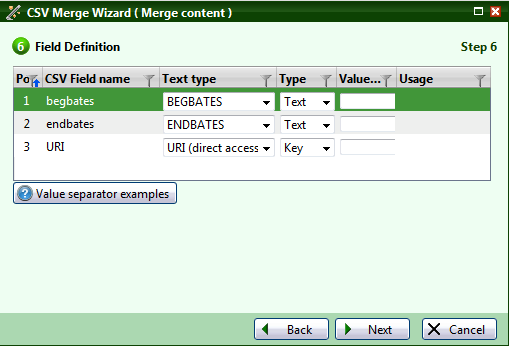
- First CSV merge, Field Definition step: Map the CSV fields Beg Bates and End Bates to the respective CORE fields
- Map Beg Bates to the CORE BEGBATES field.
- Map End Bates to the CORE ENDBATES field.

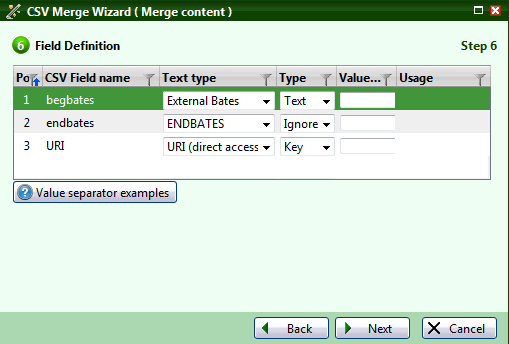
- Second CSV merge, Field Definition step: Map the CSV field BEGBATES to External Bates field
- You can map all external Bates number fields to custom Bates number fields. But the field relevant for production in Axcelerate 5 is the first Bates number of a document, the BEGBATES field.
- In the Field Definition step, map this field with the CORE field External Bates and select Text in the Type column.

- Additional Options step: Expand matches to family
- Additional Options step: Allow changing of multiple documents
- Additional Options step: Allow non-exact document matching
- Never use one of these options if you merge external Bate numbers. These options possibly assign the same Bates number to several documents. It is not possible to create a production that contains multiple documents with an identical Bates number.
- Additional Options step: Mode (Replace / Append)
- You can append Bates numbers or replace them. A document can have several external Bates numbers.
For the
mergeCSV.bat script, this means: do not use -expansionary, -noUniqueMatch or -allowUpdateMultipleDocs.